안녕하세요 주인장입니다.
Unity 엔진에서 Firebase를 활용한 구글 로그인
이번 편은 마지막 단계인 유니티 스크립트 작성과 테스트 과정입니다.
어떤 개발이든, 마지막엔 내가 만든 기능이 의도대로 동작하는지 꼼꼼히 테스트하는 게 가장 중요합니다
5. 유니티 스크립트 작성 & 테스트
1. GoogleLogin 스크립트를 작성해 다운 받아서 게임 오브젝트에 적용 시킵니다
아래 스크립트는 테스트용으로 간단하게 만든 구글로그인 스크립트 입니다
using Firebase;
using Firebase.Auth;
using Firebase.Extensions;
using Google;
using System;
using System.Collections.Generic;
using System.Linq;
using System.Net;
using System.Threading;
using System.Threading.Tasks;
using UnityEngine;
using UnityEngine.UI;
using UnityEngine.UIElements;

public class GoogleLogin : MonoBehaviour
{
    public string webClientId = "webClientId";

    private FirebaseAuth auth;
    private GoogleSignInConfiguration configuration;

    public static Action<DependencyStatus> ACTION_GOOGLE_LOGIN_CHECK;
    public static Action<Credential, string> ACTION_FIREBASE_CHECK;

    private void Awake()
    {
        configuration = new GoogleSignInConfiguration
        {
            WebClientId = webClientId,
            RequestEmail = true,
            RequestIdToken = true
        };
        CheckFirebaseDependencies();
    }

    private void CheckFirebaseDependencies()
    {
        FirebaseApp.CheckAndFixDependenciesAsync().ContinueWith((Action<Task<DependencyStatus>>)(task =>
        {
            if (task.IsCompleted)
            {
                if (task.Result == DependencyStatus.Available)
                {
                    auth = FirebaseAuth.DefaultInstance;
                }
                else
                {
                    Debug.Log($"<color=yellow>Could not resolve all Firebase dependencies : {task.Result.ToString()}</color>");
                }
            }
            else
            {
                Debug.LogError("Dependency check was not completed. Error : " + task.Exception.Message);
            }

            if (ACTION_GOOGLE_LOGIN_CHECK != null && ACTION_GOOGLE_LOGIN_CHECK.GetInvocationList().Length > 0)
            {
                ACTION_GOOGLE_LOGIN_CHECK(task.Result);
                Debug.Log($"<color=yellow>FirebaseAuth.DefaultInstance : {task.Result.ToString()} // SignInWithGoogle</color>");
            }
        }));
    }

    public void SignInWithGoogle()
    {
        OnSignIn();
    }

    public void SignOutFromGoogle()
    {
        OnSignOut();
    }

    private void OnSignIn()
    {
        Google.GoogleSignIn.Configuration = configuration;
        Google.GoogleSignIn.Configuration.UseGameSignIn = false;
        Google.GoogleSignIn.Configuration.RequestIdToken = true;
        Debug.Log($"<color=yellow> Calling SignIn </color>");
        Google.GoogleSignIn.DefaultInstance.SignIn().ContinueWith(OnAuthenticationFinished);
    }

    void OnSignOut()
    {
        AddToInformation("Calling SignOut");
        Google.GoogleSignIn.DefaultInstance.SignOut();
        PlayerPrefs.DeleteAll();
        Application.Quit();
    }

    public void OnDisconnect()
    {
        Debug.Log($"<color=red>Calling Disconnect</color>");
        Google.GoogleSignIn.DefaultInstance.Disconnect();
    }
    internal void OnAuthenticationFinished(System.Threading.Tasks.Task<GoogleSignInUser> task)
    {
        if (task.IsFaulted)
        {
            using (IEnumerator<Exception> enumerator = task.Exception.InnerExceptions.GetEnumerator())
            {
                if (enumerator.MoveNext())
                {
                    Google.GoogleSignIn.SignInException error = (Google.GoogleSignIn.SignInException)enumerator.Current;
                    Debug.LogError("Got Error: " + error.Status + " // " + error.Message);
                }
                else
                {
                    Debug.LogError("Got Unexpected Exception?!?" + task.Exception);
                }
            }
        }
        else if (task.IsCanceled)
        {
            Debug.LogError("Canceled");
        }
        else
        {
            Debug.Log($"<color=yellow>Welcome : {task.Result.DisplayName}, Email : {task.Result.Email} </color>");
            Debug.Log($"Google ID Token: {task.Result.IdToken}");
            Debug.Log($"UserId: {task.Result.UserId}");
            SignInWithGoogleOnFirebase(task.Result.IdToken);
        }
    }

    private void SignInWithGoogleOnFirebase(string idToken)
    {
        Credential credential = GoogleAuthProvider.GetCredential(idToken, null);

        auth.SignInWithCredentialAsync(credential).ContinueWith(task =>
        {
            AggregateException ex = task.Exception;
            if (ex != null)
            {
                if (ex.InnerExceptions[0] is FirebaseException inner && (inner.ErrorCode != 0))
                {
                    Debug.LogError("\nError code = " + inner.ErrorCode + " Message = " + inner.Message);
                }
            }
            else
            {
                Debug.Log($"<color=yellow>Sign In Successful.</color>");
                if (ACTION_FIREBASE_CHECK != null && ACTION_FIREBASE_CHECK.GetInvocationList().Length > 0)
                {
                    ACTION_FIREBASE_CHECK(credential, idToken);
                }
            }
        });
    }

    private void AddToInformation(string str)
    {
        Debug.LogError($"################## AddToInformation ############# : {str}");
        if (str.Equals("Calling SignOut") == true)
        {
            UnityEngine.SceneManagement.SceneManager.LoadScene("Main");
        }
    }
}
2. 간단한 테스트용 프로젝트 씬 혹은 실제로 적용할 씬을 제작합니다
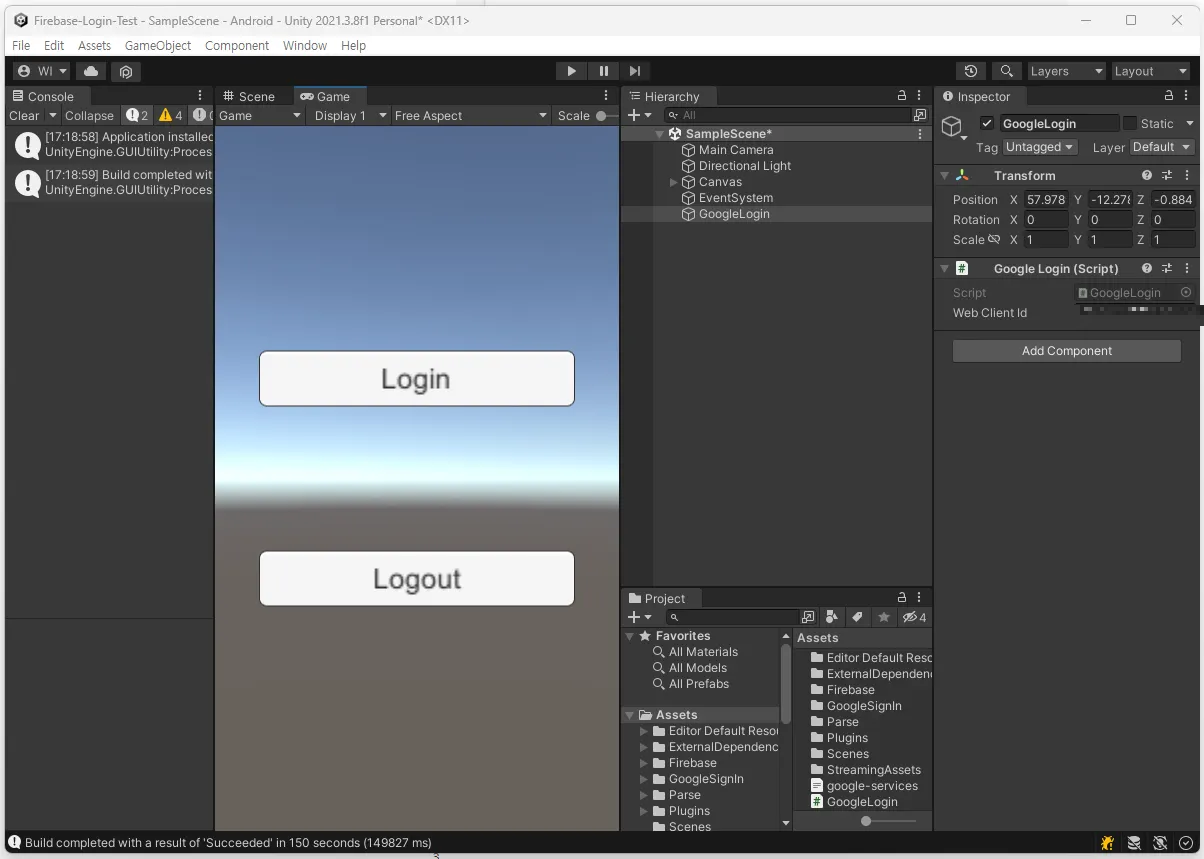
Web Client Id 는 Google Cloud Platform편 의 Web Client ID 를 입력합니다
Login 버튼에는 SignInWithGoogle() 함수를, LogOut 버튼에는 SignOutFromGoogle() 함수를 연결 하였습니다.
3. 안드로이드 기기를 연결 한 후 Build and Run 버튼을 누릅니다
4. 앱 실행 후 Login 버튼을 눌렀을때 구글 로그인 팝업창이 뜨는지 확인합니다
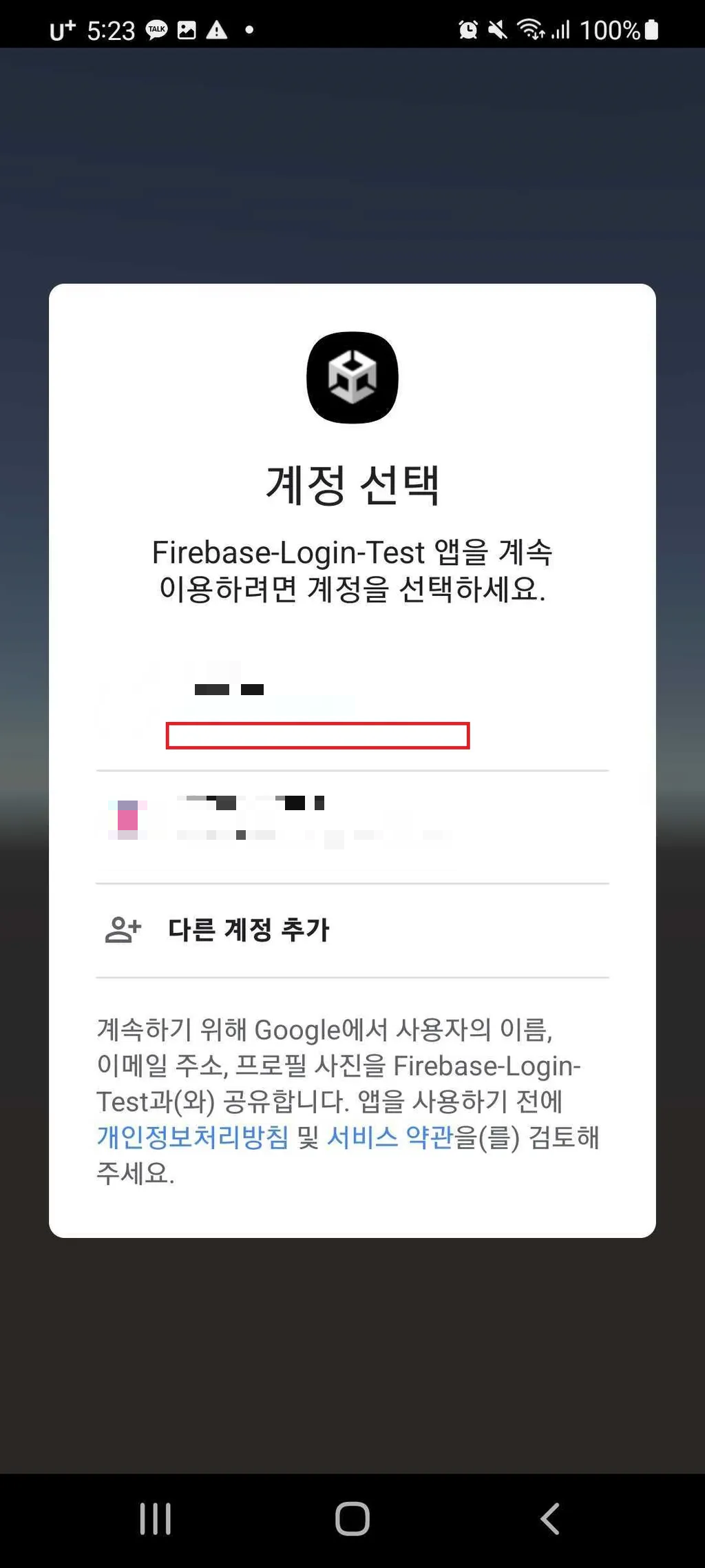
5. FireBase 프로젝트로 돌아가 Authentication 에 로그인 기록이 남는지 확인합니다

6. 로그에 로그인 정보들이 잘 뜨는지 확인합니다
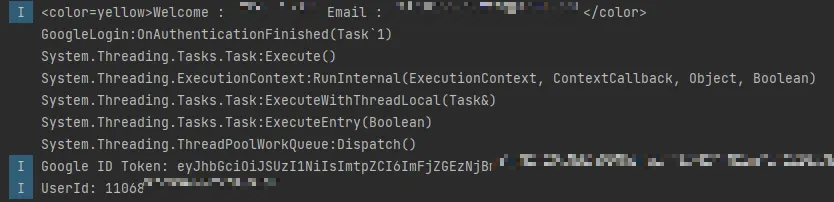
이로써 Unity 엔진을 활용한 Firebase 연동 구글 로그인 편을 마치도록 하겠습니다.
오늘의 기록은 여기까지. 주인장은 이만 로그아웃합니다. 모두 평안한 밤 보내세요!
'개발 > Unity' 카테고리의 다른 글
| [Unity] IOS 빌드 (0) | 2025.10.17 |
|---|---|
| [에셋/툴] Skybox Blender (0) | 2025.10.16 |
| [Unity] Firebase 연동 구글 로그인 (4) : Google Cloud-Platform & Firebase Authentication (0) | 2025.10.16 |
| [Unity] Firebase 연동 구글 로그인 (3) : Firebase (0) | 2025.10.16 |
| [Unity] Firebase 연동 구글 로그인 (2) : 유니티 & 구글 플레이 콘솔 (0) | 2025.10.16 |


